Projects
August 19, 2026•7 min read 

Waynergy: One Keyboard, Two Desks

Waynergy: One Keyboard, Two Desks
Hyprland
Wayland
Quickshell
QML
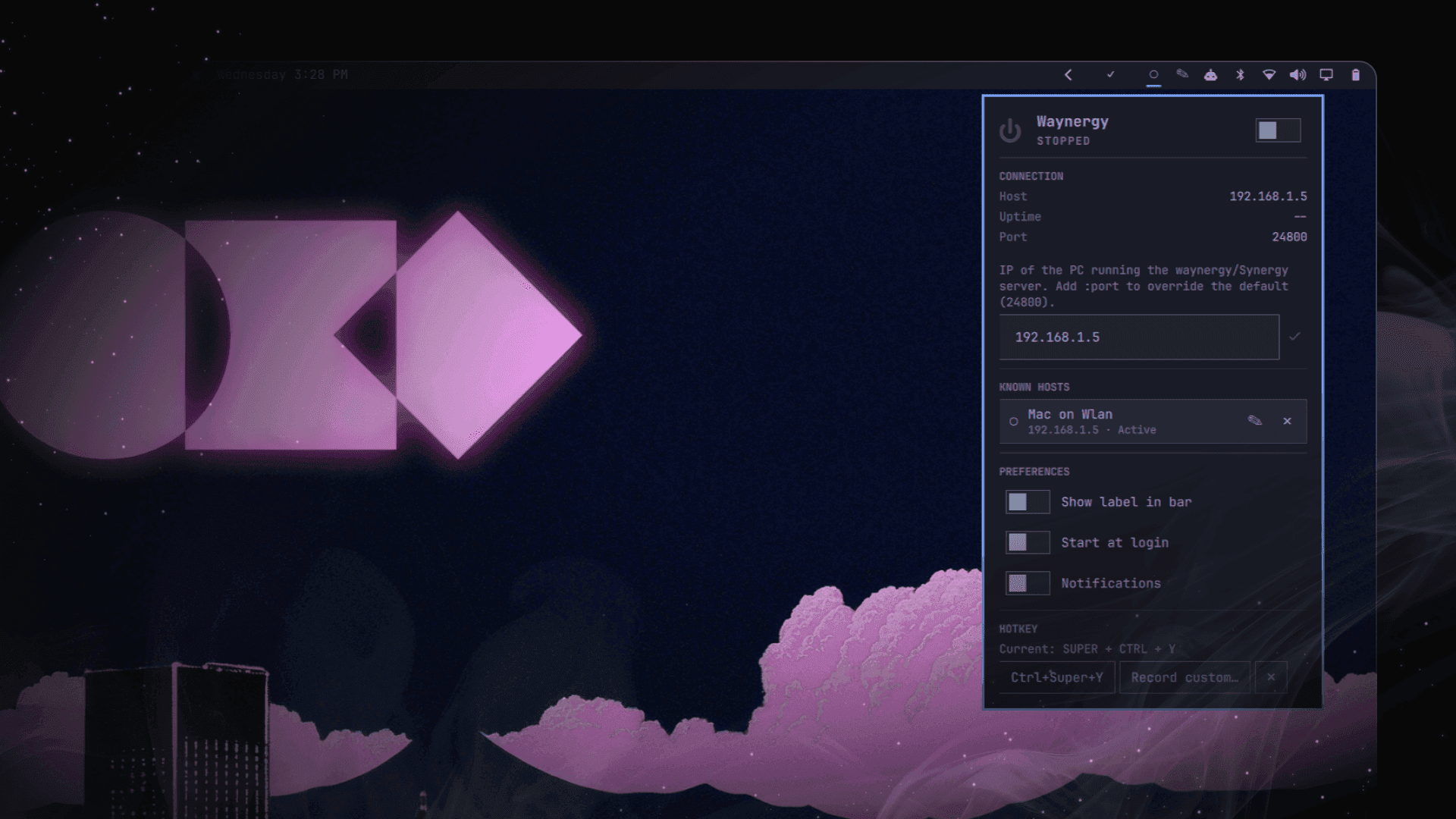
My Mac sits next to my Omarchy desktop, not instead of it. Different jobs, different tools, and most days I'm moving between them constantly — a design open on one, a terminal open on the other, a message that needs answering on whichever one isn't currently in front of me. What I didn't sign up for was two keyboards and two mice. Every switch meant physically reaching for a different set of hardware, re-finding where my hands were supposed to be, breaking whatever rhythm I'd just built up. It's a small tax. It's also one you pay dozens of times a day, and small taxes paid that often stop being small. I knew the technology to fix this already existed. I just hadn't made it convenient enough to actually use. Deskflow (the actively maintained fork of Synergy/Barrier) runs as a server on the Mac and hands control of its keyboard and mouse to whichever client connects to it. On the Wayland side, that client is waynergy — a Wayland-native reimplementation that actually works properly under Hyprland, unlike most of the alternatives I tried first. Once I had it running, it worked exactly like it's supposed to: move my cursor off the edge of one screen, and it's suddenly controlling the other machine. That part was never the problem. The problem was everything around it. Starting it meant opening a terminal and typing waynergy -c 192.168.1.5 -p 24800 -E from memory, or worse, digging through shell history for it. Stopping it meant finding the process and killing it by hand. And the one time my Mac's IP actually changed — a DHCP renewal, nothing dramatic — I had no fast way to update it without editing a command I'd half-memorized. None of that is hard. All of it is friction, and friction is the entire reason I was looking for a fix in the first place. Omarchy's bar is full of little widgets that answer a question before you ask it — Wi-Fi, Bluetooth, the clock, my Todoist tasks. My cross-desk keyboard sharing wasn't one of them. So I built it. The bar pill is a single glanceable dot — filled when waynergy's running, hollow when it's not — with a right-click to toggle it on or off right there, no panel required. Left-click opens the actual control surface: a power toggle, a connection-details grid showing the host, port, and how long the session's been up, a field to change the target host (plain IP, or ip:port if the other side isn't on the default), and a global keyboard shortcut so the whole thing never needs a mouse at all. The part I use daily without thinking about it anymore is Known Hosts — the last few machines I've connected to, saved as one-click rows I can name ("Home Mac" instead of an address I'd otherwise have to remember). Switching targets is now exactly as fast as switching Wi-Fi networks.
Waynergy's panel — status, connection details, Known Hosts, and the keyboard shortcut recorder
Here's the one I'd rather not have needed, but it's the most honest thing to write about.
The BugThe first version stopped waynergy the obvious way: find whatever process is named waynergy, send it a kill signal. That works fine right up until it doesn't — if a stale or blocked instance is sitting around anywhere on the system, "stop the current session" and "stop whichever one pgrep happened to match" are not the same instruction, and there was nothing distinguishing them.
The FixThe actual fix was to stop guessing by name and start tracking the specific process this plugin launched. waynergy runs detached — deliberately, so a plugin reload never kills a live session — which means there's no direct handle back to it. So the launch itself now goes through a small wrapper that backgrounds the process, captures its real PID, and writes it to a small state file. Every stop or status check after that verifies /proc/<pid>/comm still says waynergy before it trusts or signals that PID at all — closing off the exact race a plain name match couldn't see.
Verified Before ShippingI didn't just read that code and trust it. I ran the whole sequence by hand outside the plugin first — start it, capture the PID, verify the identity check, send the kill, confirm it actually stopped — before it went anywhere near the real UI. A clean-looking fix for a targeting bug is exactly the kind of thing worth not taking on faith.
SymptomThe second one is the one that actually prompted the fix, because I kept running into it myself: disconnect mid-keypress, and whatever key was down stayed down — logically held, as far as the OS on the receiving end was concerned — until I touched my desktop's own physical mouse or keyboard to clear it. Not dangerous, just genuinely annoying on a machine I was supposedly trying to make less friction, not more.
Root CauseThe reason turned out to be almost mundane: waynergy exposes a virtual input device, and if the connection dies mid-hold, that device never gets the clean release event it needs. Touching real hardware works because a fresh input event supersedes the stuck one at the OS level. Which meant the fix didn't need new hardware-level tooling at all — it needed the plugin to do the equivalent in software: detect the drop, and cleanly restart the session so that device gets torn down and rebuilt properly.
FixSo the plugin now actually checks that the connection is alive, not just that the process is running — a real TCP probe to the host, not an assumption — and if it stays unreachable for a few seconds (not on the first blip; a flaky network shouldn't trigger a restart storm), it stops and restarts waynergy on its own, up to a few attempts before it gives up and just tells me. No more reaching for a mouse to fix a keyboard.
I know this plugin has a small audience. Most people aren't running two full desks side by side, and of the ones who are, fewer still are doing it on Omarchy specifically. I built it entirely for myself first. But the whole reason I open-source things like this is that "niche" and "useless to everyone else" aren't the same claim. Someone out there has the exact same two-keyboard problem I did, on the exact same desktop, and would rather install a bar widget than remember a command. If that's you — hi, this one's for you too. The plugin is free and open source. Right-click the bar pill once you've got Deskflow (or Synergy) running as a server on the other machine, and you're connected. Left-click any time you need to change the host, rename it, or set a shortcut.
"The best fix for 'I have to touch real hardware to unstick this' turned out to be making the software let go properly in the first place."
—Aryan Techie

Share this post: