Blog
November 7, 2026•14 min read 

One Event, Five Stages, Two Agents: Building Ferri on Switch

Aryan Techie
One Event, Five Stages, Two Agents: Building Ferri on Switch
It needs a website with a real database behind it. A sponsor pipeline. A marketing calendar. A guest list with a waitlist. A crew that makes decisions every hour, and a community spread across five chat apps that needs to hear every one of them. Then the event ends on a Sunday. Everyone goes home. And the next one starts from zero. Rudra and I built Ferri to run that startup with you, from the first idea to the starter kit for the next edition. It's built on Switch, for WeMakeDevs' Flip the Switch hackathon. Ferri in one breath:
  • Plan: it reads your crew's chat and keeps the plan: decisions, owners, tasks, deadlines
  • Build: its second agent, Ferri Builder, ships the event site with registration and a database, the posters, and the Luma listing
  • Launch: it finds sponsors and partners, emails them, tracks the replies, posts announcements and social posts, and keeps the guest list
  • Live: it runs the event's groups on Discord, Telegram, Slack, WhatsApp and Mattermost, with a source under every answer
  • Wrap: it writes the recap, saves every partner, and turns the whole event into a starter kit for next time
Nothing goes out in your name without a human tap. Announcements, emails, social posts, listings and deploys each wait on one approval card. Watch the three-minute demo, or keep reading for how it works and how to run it yourself. The name comes from a ferry: the boat that carries people, things and ideas from one shore to another, and back again. Every event has two shores. The crew is on one: the organizers in their own group chat, making decisions. The community is on the other: attendees, speakers and sponsors, spread across every app they already use. Most of the chaos of running an event lives in the water between them. Decisions that never reach the groups. Questions that never reach the right person. Ferri works both shores at once. It carries the crew's decisions out to every group, and carries the community's questions and needs back to the right person on the crew. And a ferry makes the return trip. When the event ends, Ferri carries everything it learned to the next one. This is the design decision everything else hangs off. In Ferri, you don't configure a bot. You create an event, and the event owns everything: Groups attach to an event. Knowledge is scoped to an event. Settings like tone, language and how fast to escalate layer from the community, to the event, to each group. When the event closes, its groups switch off or move to your next live event with their modes intact. And "@ferri start Build Night 2 from the Build Night kit" opens the next edition with everything worth keeping already in place.
"You don't set up a bot. You create an event, and the event owns everything."
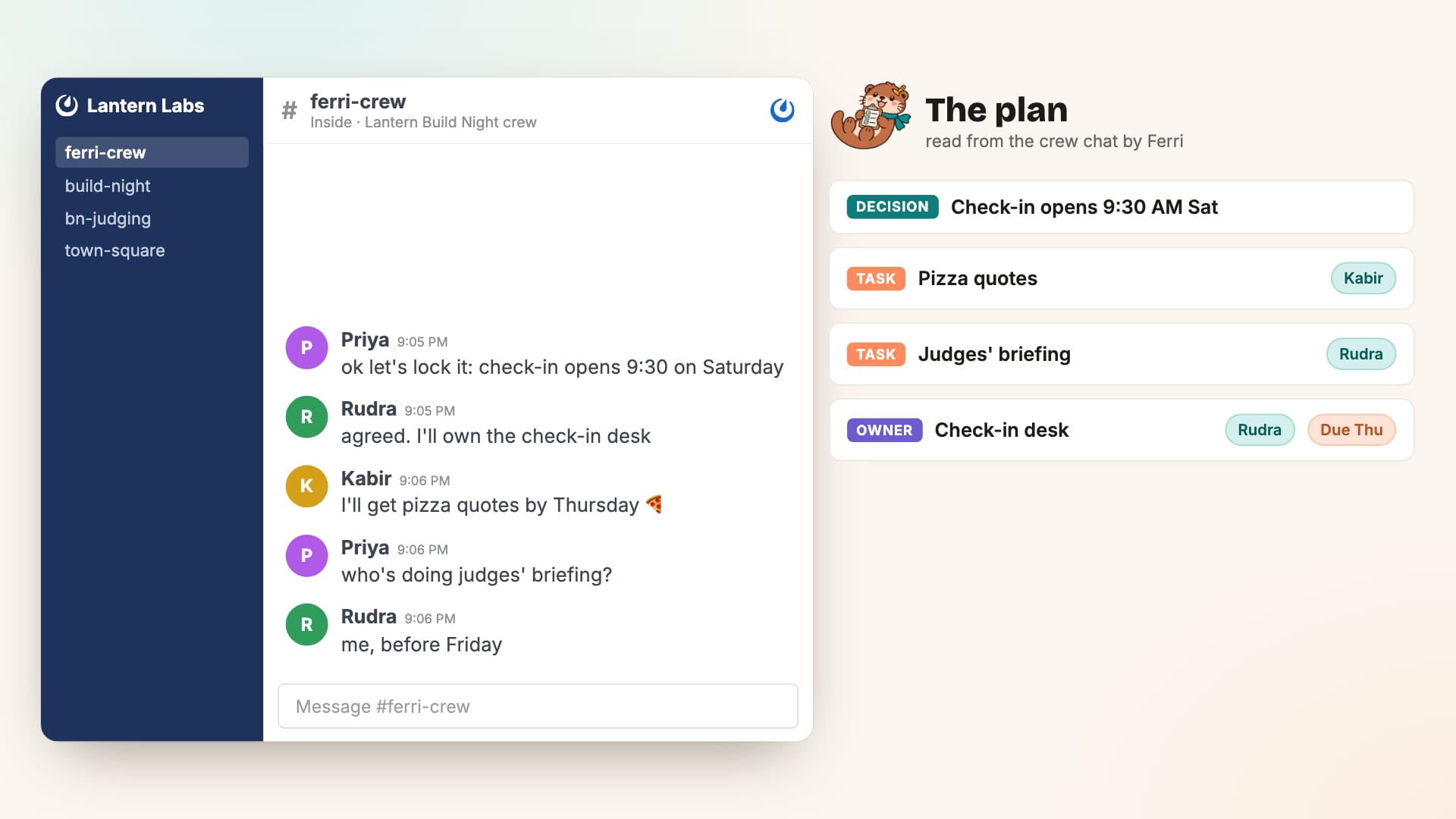
Your crew already plans in a group chat. Ferri reads it and keeps a living plan: decisions, owners, tasks with deadlines and open questions. It reminds owners before deadlines, with a push to their phone. "@ferri draft the agenda" turns every decision into a card the crew can confirm or drop. Confirmed decisions that matter to attendees become knowledge Ferri can answer from, and the plan itself lives as a document attached to the crew's room in Switch.
A frame from the Ferri demo video: the crew chat on the left, and the plan Ferri reads from it on the right, with a decision, tasks and owners
This is where the second agent comes in. Ferri Builder is Claude Code running as a managed agent on Switch. Ferri created it through Switch's agent management, and hands it jobs straight from the crew's chat: "@ferri get the builder to make the poster and ship the Build Night site." What the Builder ships:
  • The event site: Next.js on Vercel and Supabase, with registration, a capacity and waitlist, sign-in by email link, schedule, FAQ, an admin view with CSV export, and for hackathons, sponsor credits with atomic claims and an audit log
  • The posters: background art from an image model, then the exact text, logo and QR code drawn on top, in six sizes from A4 print to Instagram story. It refuses to finish unless every QR code scans back to the right link
  • The Luma listing: filled in its own browser, with a screenshot posted for the crew
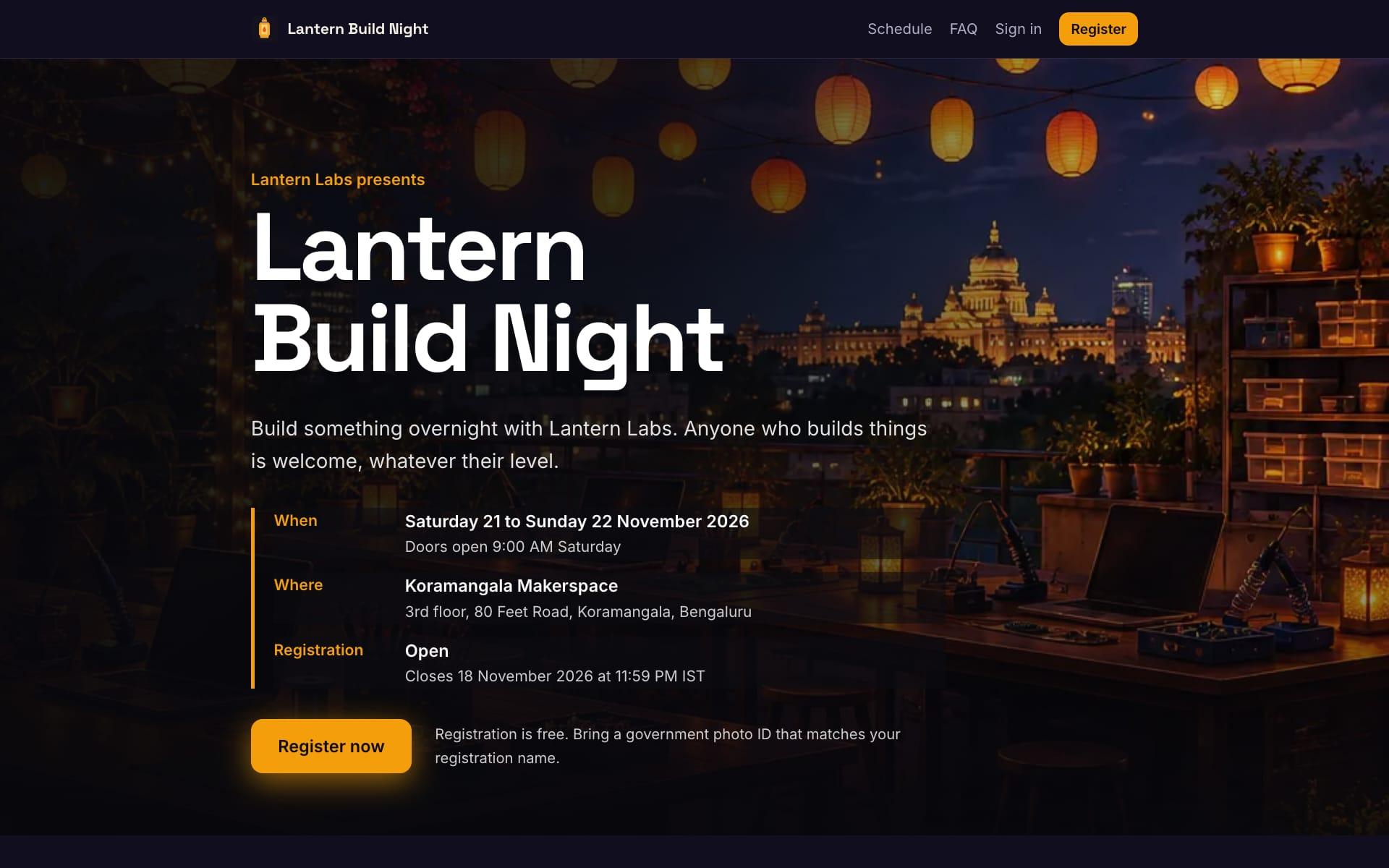
Here's the site it shipped for our demo event, built from its site kit with the facts from the crew's room, in the look of the posters it drew first.
The live Lantern Build Night event site that Ferri Builder built and deployed, with the event title, date, venue, open registration and a Register now button over a lantern-lit rooftop
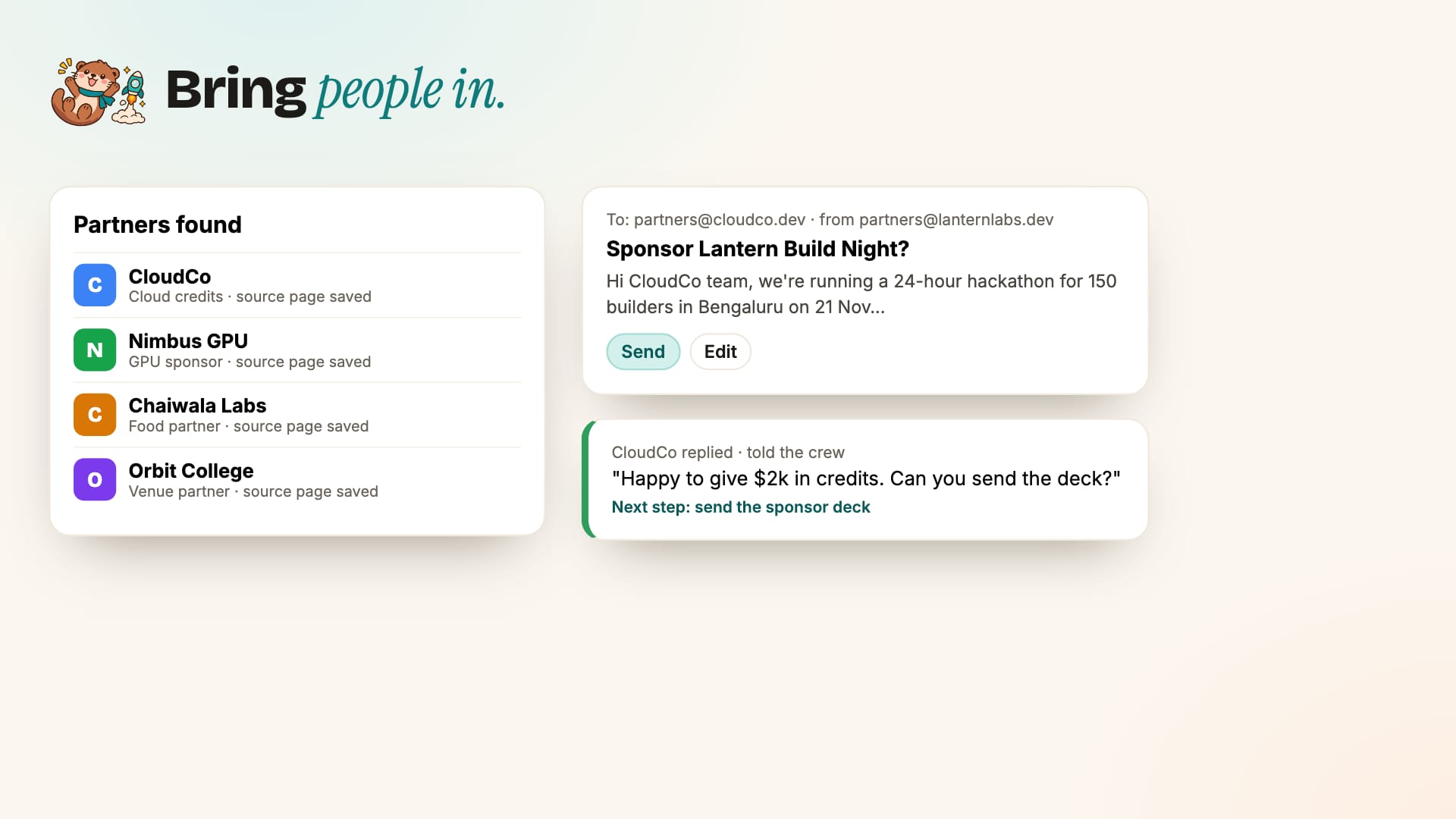
And it never goes public on its own. vercel deploy --prod and Luma's publish button are permission cards in the crew room. "Allow once" ships it. "Decline", and nothing in the world changes. Once the site is live, it reports the first registration, then every tenth, back to the crew. See the live site. Now you need people in the room. Sponsors and partners. "@ferri find colleges and companies that could sponsor Build Night" is a research job for the Builder. Every prospect it finds goes into Ferri's contacts with the page it came from. "@ferri email CloudCo about sponsoring" drafts an email from the event's own facts and waits on a card. Once approved, it goes out from your domain with a reply address unique to that contact. When CloudCo replies, Ferri reads it, tells the crew what they said and what to do next, and opens a card for the response. If someone says no thanks, the code makes sure nobody emails them again.
A frame from the Ferri demo video: a list of partners found with their sources, an outreach email draft waiting on Send, and a sponsor's reply summarized for the crew with a next step
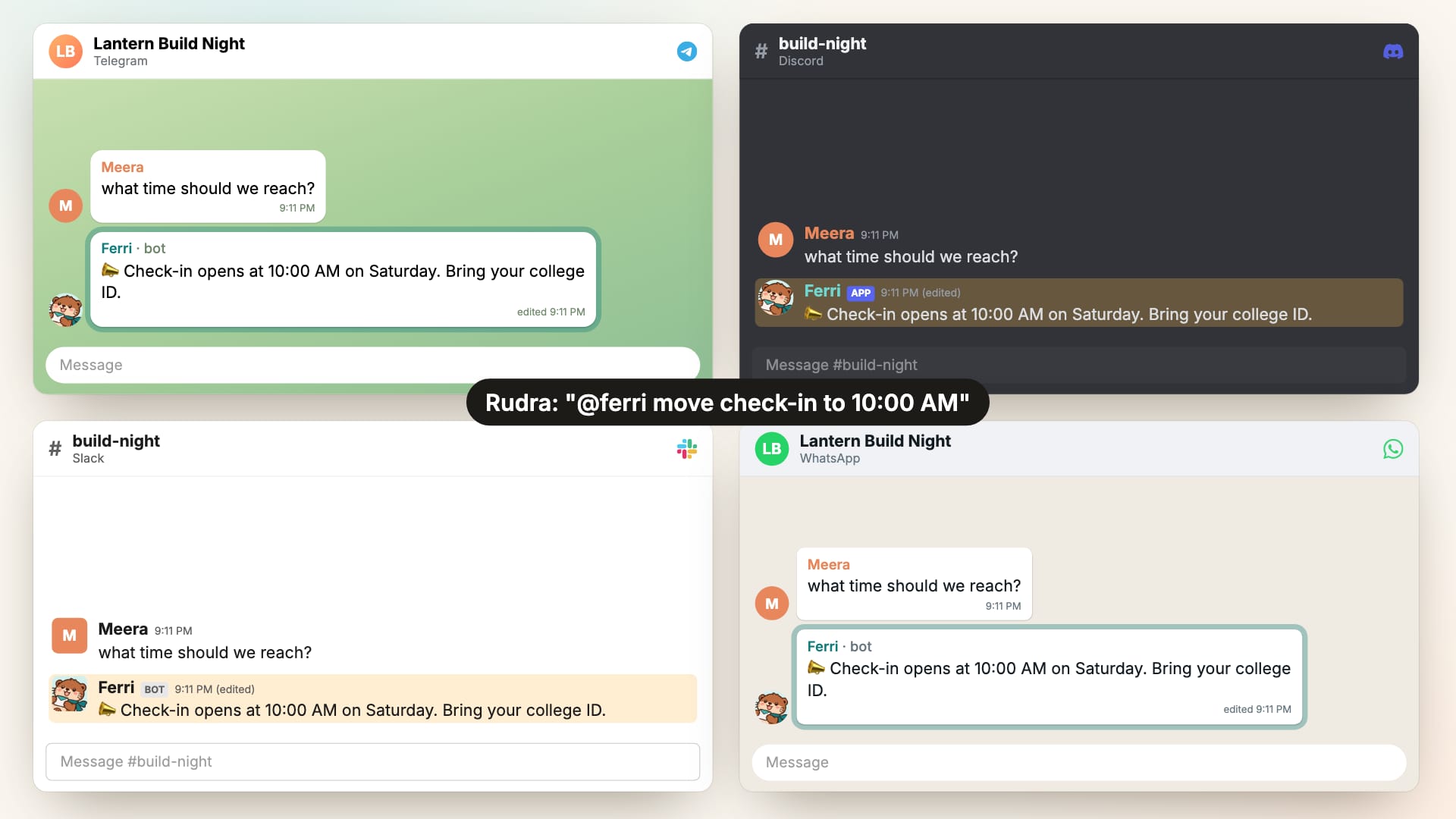
Announcements. When the crew decides something attendees should know, Ferri drafts the announcement and shows one card with the text and every group it will reach. One tap posts it everywhere. If the details change later, Ferri edits the original post in every group instead of posting a correction underneath.
A frame from the Ferri demo video: the same announcement in Telegram, Discord, Slack and WhatsApp, each edited in place from 9:30 AM to 10:00 AM
Everything else in Launch:
  • Posters as real images: the Builder's square poster goes to every group with a caption, after one OK
  • Social: LinkedIn, X and Instagram posts drafted from the event's facts and sent to Buffer to post, schedule or save as drafts
  • Guests: one list from the site, Luma and CSV files, personal reminder emails with each guest's RSVP link, and a freed spot offered to the next person on the waitlist
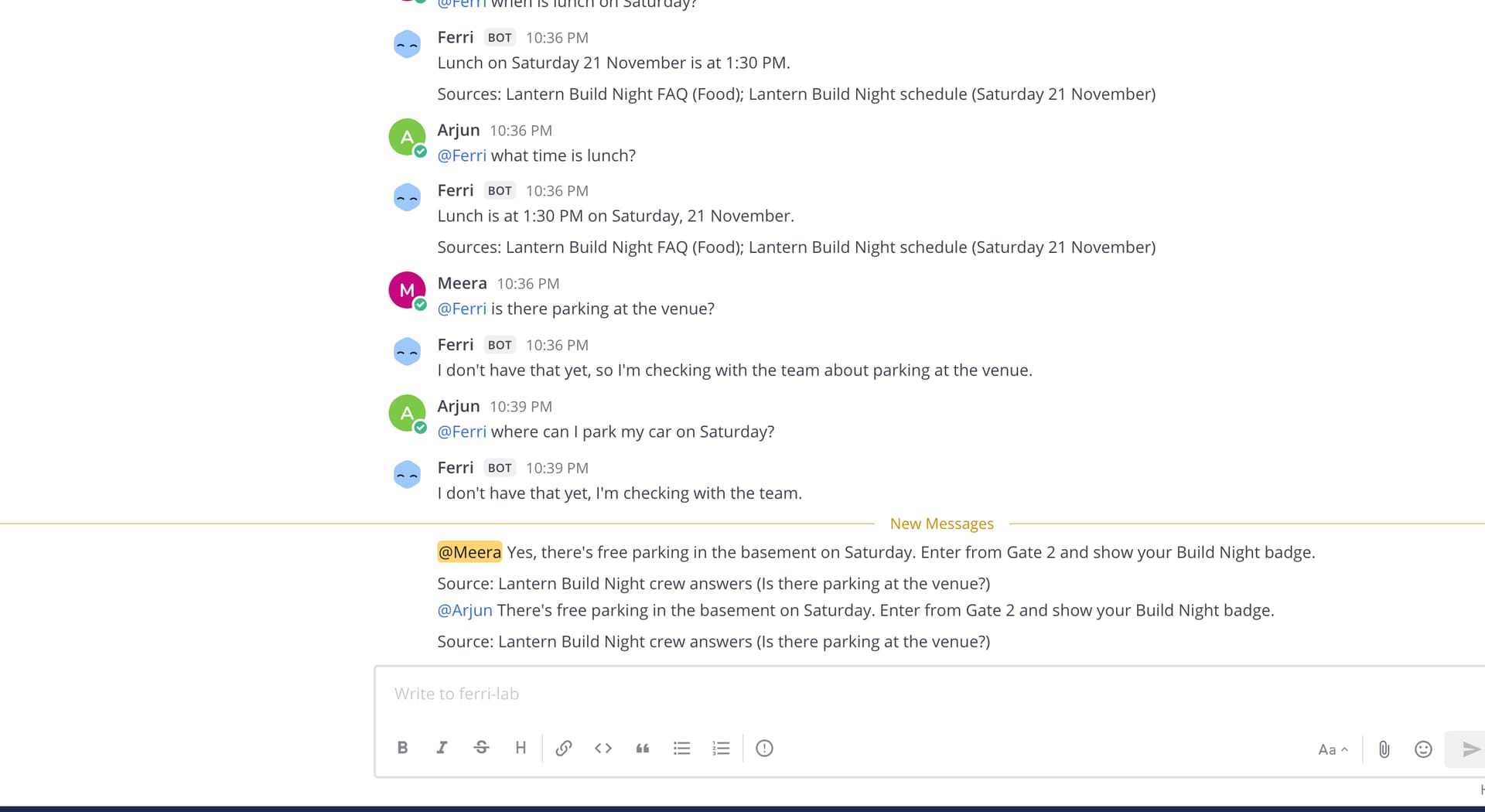
On the day, the community is everywhere, and Ferri is in every group. It answers only from the event's knowledge and prints the source under every answer. If it doesn't know, it doesn't guess. It sends the question to the crew member who owns that topic, then whoever is on duty, then everyone. Their answer goes back to everyone who asked, on their own app, and becomes knowledge for next time.
Real Mattermost screenshot: two members ask Ferri about parking, Ferri says it is checking with the team, then answers both with the crew's answer and a Source line
The rest of Live:
  • Ferri Pocket: a web app the crew installs on their phones, with push notifications for every card that needs them
  • Care: an attendee who is stuck, upset or unsafe becomes a case with an owner, and technical problems can go straight to the Builder to help in that person's own chat
  • Desks: "@ferri make a judging desk with Arjun" creates a private channel on your platform with its own rules and a shared sheet. The check-in desk marks guests as arrived
  • Shield: scam links, link floods and leaked API keys are stopped on every message in 2 to 9 ms, with no model in the path
  • Desk: one dashboard where organizers see all of it, and one button to pause Ferri everywhere
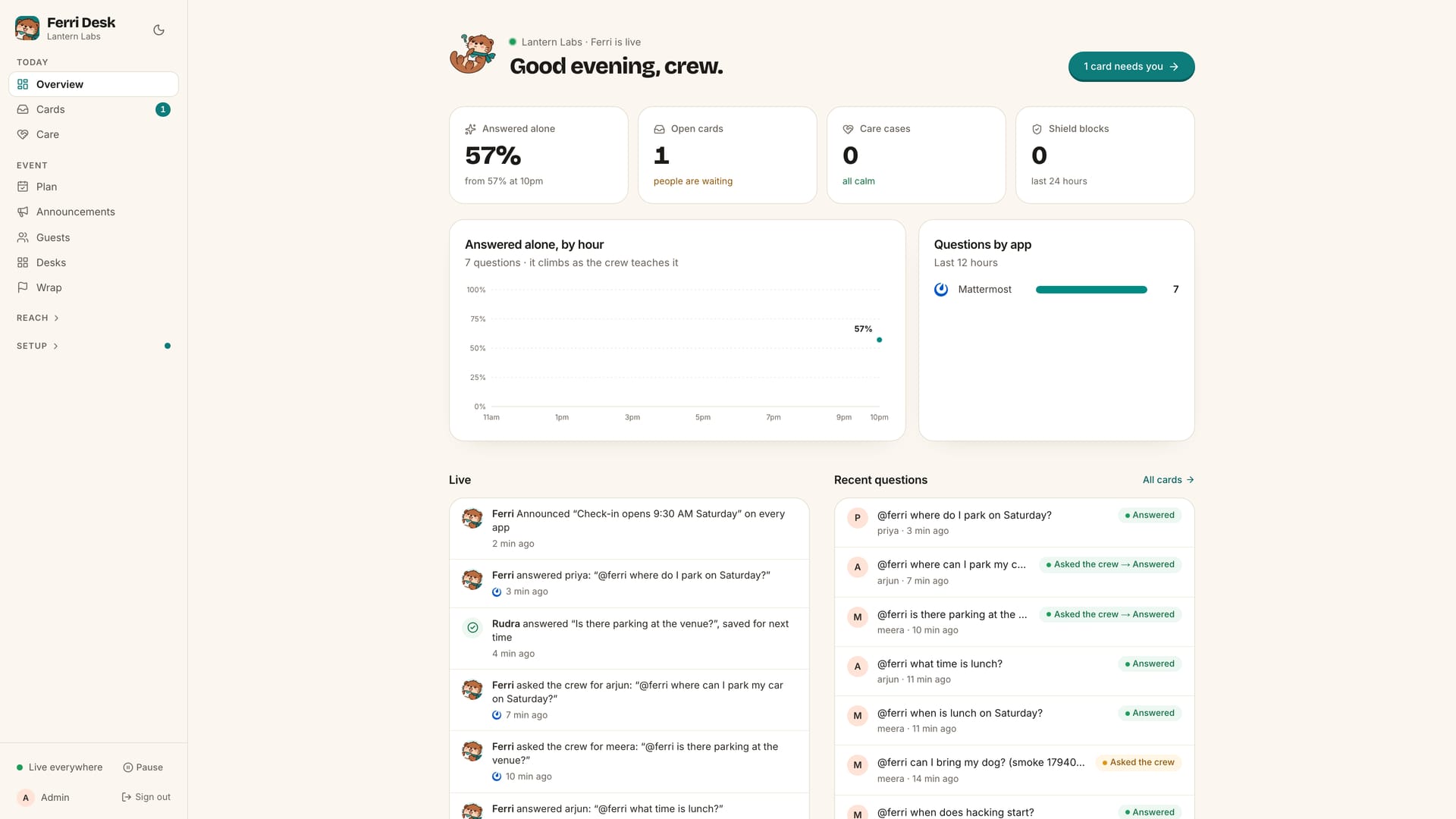
Ferri Desk overview: questions answered without the crew, open cards, care cases, Shield blocks, a live feed of Ferri's actions and recent questions
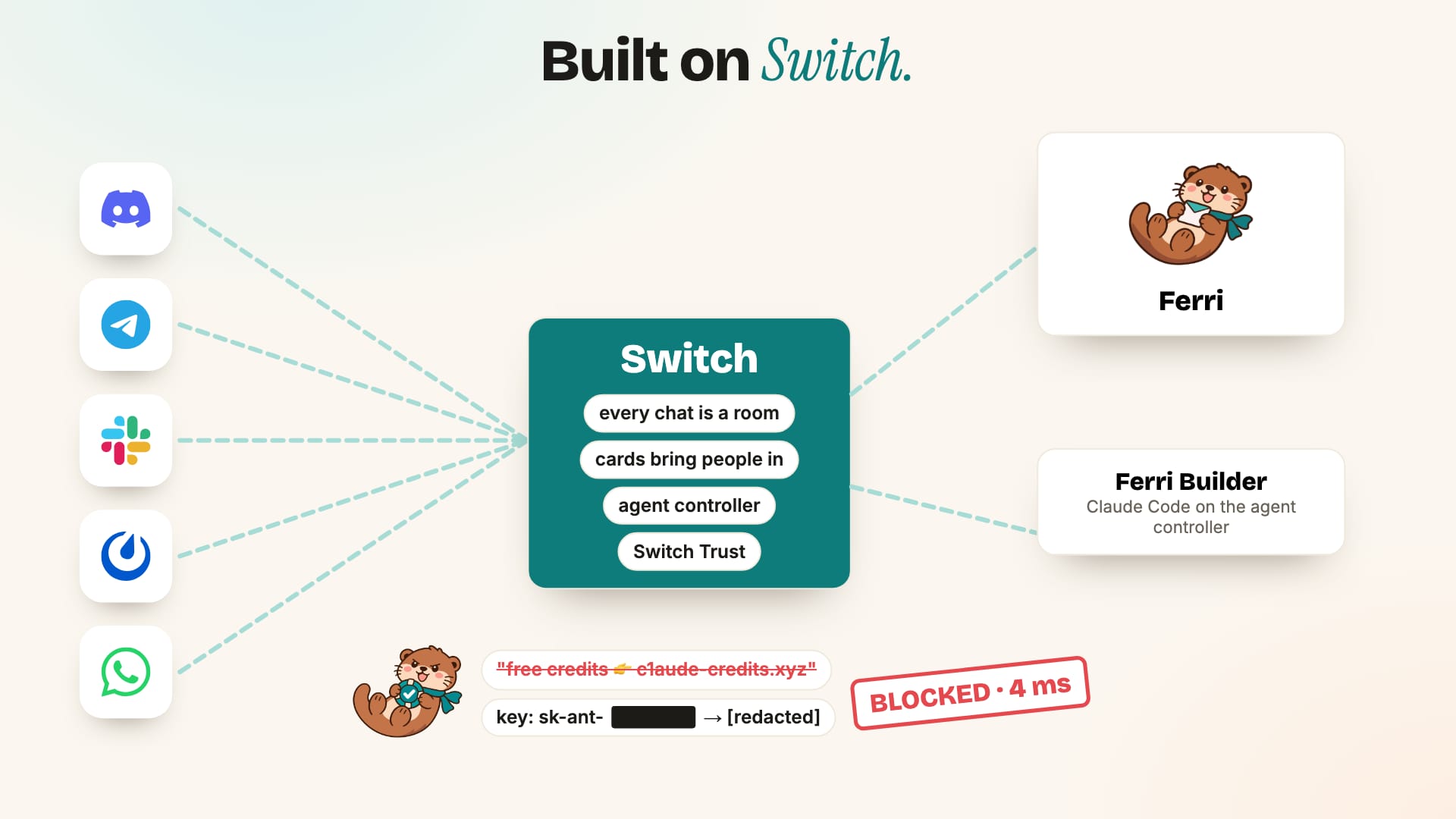
This is the stage most tools forget, and the reason the event is the unit. After the event, Ferri writes a recap with every number counted in code: questions, cards, guests, check-ins, emails, Builder jobs, Shield blocks. It adds a short "lessons" section, and any sentence containing a number that isn't in the real stats gets dropped before you see it. Every sponsor and partner is saved to your contacts with the events they worked on. Then it builds the starter kit: the knowledge worth keeping, the questions people asked most, the ones nobody answered, the plan, the groups and their modes, the desks, the partners and the lessons. Closing the event turns its groups off or moves them to your next event, closes its open cards and cancels anything still scheduled. "@ferri start Build Night 2 from the Build Night kit" and the next edition begins where this one ended, not from zero. Here's the honest test for how central Switch is: take it away and see what's left. Without Switch, Ferri is five platform integrations duct-taped together, a homemade approval system, no way to run the Builder and no safety layer. With it, five apps become one problem.
A frame from the Ferri demo video: Discord, Telegram, Slack, Mattermost and WhatsApp connect to Switch, which connects to Ferri and Ferri Builder, with Shield blocking a scam link and redacting a leaked key
What Switch gives Ferri, stage by stage:
  • Rooms and bridges, in every stage: a Telegram group, a Discord channel and a Mattermost channel all become Switch rooms. Ferri talks to rooms, never to five different platform APIs
  • Cards, in every stage: approvals and questions render as real buttons on Telegram, Slack and Discord, and as a typed reply everywhere else. Every "nothing public without a tap" promise is a Switch card
  • Agent management and the agent controller, in Build: Ferri created the Builder through Switch, and the controller runs it with its own folder, budget and permission prompts that turn into cards
  • Room templates, in Live: desks are real private channels created from a Switch template
  • Library documents, in Plan and Wrap: the plan, the recap and the starter kit are documents attached to the crew's room
  • Switch Trust, in Live: every message passes through Shield before anyone sees it
Where Switch stopped, we forked it. Agent message editing (so announcements can be updated in place) and WhatsApp through a linked device both live in our fork. You need Docker and an Anthropic API key. That's it. What ./ferri up does for you:
  • Writes .env, asks for your Anthropic key once, and generates every other secret
  • Starts the whole stack: Switch's core and gateway, Mattermost, Postgres with pgvector, Ferri and Desk
  • Signs in to Switch, mints a personal registration key, and registers Ferri as an agent
  • Creates ferri-lab for the community and ferri-crew for the crew, and seeds a made-up event, Lantern Build Night
  • Prints every URL and login
Open Mattermost, go to ferri-lab, and say: You'll get the time with its source. Ask something it can't know, like @ferri can I bring my dog?, and a card appears in ferri-crew. Answer it with the card's code, for example A1 "Yes, dogs are welcome", and Ferri replies to the asker and remembers it. Bring in real platforms: Each one creates a Switch bridge. Add the bot to your group, type !invite-agent @ferri, then attach the group to your event in Desk. The Builder runs on your own machine with Claude Code, and pnpm builder:setup walks you through it. For a first-time Switch user, this is the whole mental model: events come down one stream, actions go up as plain HTTP. Shield plugs in with one setting. Point Switch at your endpoint with PUT /gateway/trust-settings, and from then on Switch posts every message to {endpoint}/guardrails/check and expects OK, BLOCKED, REDACTED or ALERTED back within two seconds. Switch gotchas worth knowing on day one:
  • Keep cursors as strings. Switch sequence numbers can grow past JavaScript's Number.MAX_SAFE_INTEGER. Parse one as a number and you'll quietly replay or skip events
  • "Addressed" doesn't always mean mentioned. A person's next message within five minutes of your agent answering them, or a reply in its thread, also counts. Check for a real mention before assuming they're talking to you
  • Mentions inside a card don't ping anyone. Switch escapes them on purpose, so post a separate message to ping the owner
  • Card prompts get cut at 800 characters on Mattermost and WhatsApp. Put long context in a message right above the card
  • Close your own cards before Switch expires them. An expired card renders as "answered", which is very confusing for a crew
  • Agents only see what's addressed to them. Ferri never sees the Builder's posts on its stream. To read what another agent posted, use the read_context op
How we built it:
  • Trust rules live in code, not prompts. If an answer doesn't cite a real knowledge entry, the code downgrades it to "I'm checking with the team" before it's sent. No prompt can talk it out of that
  • Every feature works end to end on the real stack before the next one starts. No mocks pretending to be done. That's why we can say 158 of 158 answer checks pass on the real model, with 255 unit tests and a full-stack smoke test in CI
  • The event is the unit. Every time we were unsure where something belonged, the answer was "on the event". It's why Wrap and the starter kit fell out naturally instead of being bolted on
Think about the last event you ran, or helped run. The website, the sponsor emails, the reminders, the group chats, the recap you meant to write. Now imagine all of it living in one place, owned by the event, carried forward to the next one. Clone Ferri, run ./ferri up, and create your first event. Run the event. Ferri runs the rest.
Share this post:

Subscribe to Aryan’s Newsletter

On The Insight Journal, I share ideas at the intersection of code, clarity, creativity, and systems.